

The Redirect Any App Could Catch leading to ATO
The Redirect Any App Could Catch
This is my first Android blog. The web app was solid, every access control held, every endpoint was properly scoped, so I shifted to the mobile app instead. What I found there was an OAuth flow that handed out authorization codes over a custom URL scheme that any app on the phone could register and intercept.
The bug, short version: the Android app authenticates via a public OAuth client whose client_id is in the APK. The authorization code is delivered to a custom URL scheme (redacted://redirect/android) instead of a verified HTTPS App Link, so any co-installed app can register the same scheme and catch the code, then trade it for the victim’s token.
The public client
The web app’s OAuth client was confidential, so exchanging a code required a client secret I didn’t have. Mobile apps can’t keep secrets (the binary is on the user’s phone), so mobile OAuth clients are almost always public, relying on PKCE instead of a client secret.
In an environment-config class (cq7.smali) I found four client IDs (one per environment), the authorize and token endpoints, the redirect URI (redacted://redirect/android), and the scope (openid profile):
PRD <prod client id>ACC <acc client id>TST <tst client id>DEV <dev client id>I ran the flow: log into the identity server in a browser to get the SSO cookie, hit /app/oauth/authorize with the public client ID, catch the 302 redacted://redirect/android?code=..., and POST the code to /app/oauth/token. Out came a real JWT:
{ "scope": ["openid","profile","mapi","link"], "acr": "urn:redacted:level:200", "user_name": "<redacted>", "authorities": ["ROLE_ENDUSER"], "client_id": "<prod client id>"}Adding Authorization: Bearer <token> plus two headers the app always sends (X-Timezone-Offset, X-Client-Platform: ANDROID) opened the entire mobile API, including data the web API didn’t expose, like date of birth and phone number.
The redirect anyone can claim
The OAuth redirect URI for this app is redacted://redirect/android. That’s not a web address. It’s a custom URL scheme, a made-up protocol that only means something on a phone where an app has registered to handle it.
The problem: on Android, there is no ownership check for custom schemes. Any app can declare the same scheme in its AndroidManifest.xml:
<intent-filter> <action android:name="android.intent.action.VIEW"/> <category android:name="android.intent.category.DEFAULT"/> <category android:name="android.intent.category.BROWSABLE"/> <data android:scheme="redacted" android:host="redirect" android:path="/android"/></intent-filter>RFC 8252 (“OAuth 2.0 for Native Apps”) calls this out explicitly in §8.1: private-use URI schemes are vulnerable because multiple apps can register the same scheme. The RFC recommends claimed HTTPS redirect URIs (App Links on Android, Universal Links on iOS) instead.
And the frustrating part: the target already has App Links set up. Checking <redacted-host>/.well-known/assetlinks.json returns a valid Digital Asset Links file binding the domain to the signed app. If the OAuth redirect used an https:// App Link covered by this file, Android would verify domain ownership and deliver the code only to the correctly-signed app. They had the secure mechanism ready and used a custom scheme for the one flow that needed it most.
The attack
Opening the authorize URL in a Chrome Custom Tab
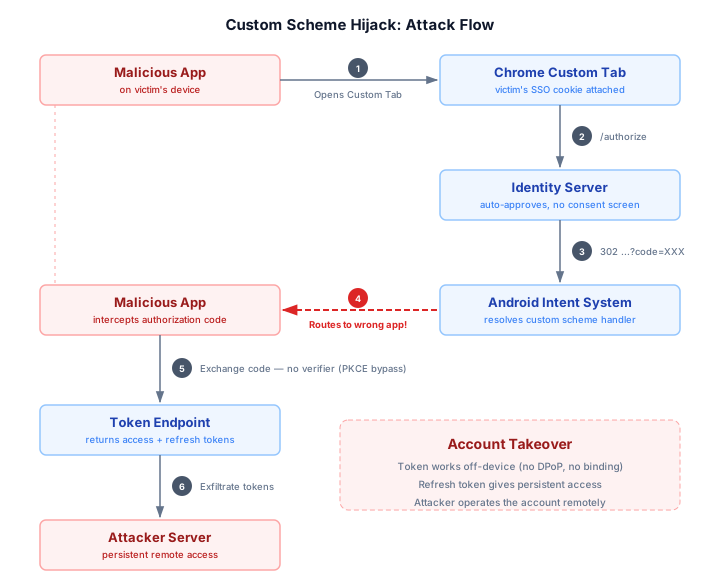
The malicious app constructs an OAuth authorize request using the public client_id extracted from the APK and opens it in a Chrome Custom Tab.
The reason Custom Tabs matter here is how they handle cookies. A WebView runs in the app’s own process with its own cookie jar, completely isolated from Chrome. A Custom Tab is different: it runs inside Chrome’s own process, sharing Chrome’s cookies, autofill data, and saved passwords. From the server’s perspective, the request coming from a Custom Tab is indistinguishable from one coming from a normal Chrome tab. So if the victim has an active session in Chrome, the Custom Tab carries that session automatically. The malicious app never sees the cookie directly. It doesn’t need to. It just needs Chrome to present it to the server.
Silent authorization
The authorize request hits the identity server with the victim’s valid session cookie attached. Because the server recognizes the session and the OAuth client has been pre-approved (this is the app’s own first-party client, not a third-party integration), it skips the consent screen entirely. There is no “Do you want to authorize this app?” prompt. The server immediately issues an authorization code and responds with:
302 redacted://redirect/android?code=XXXThis is standard behavior for first-party OAuth clients. The server trusts its own client_id and assumes the request is coming from its own app. It has no way to verify that assumption because the client_id is public, embedded in the APK for anyone to extract.
Android routes the code to the wrong app
Chrome receives the 302 redirect and sees a URL with the scheme redacted://. This is not an https:// URL, so Chrome doesn’t handle it itself. Instead, it hands it off to Android’s intent resolution system to find an app that has registered to handle this scheme.
This is where the custom scheme weakness becomes exploitable. With an https:// App Link, Android checks the domain’s /.well-known/assetlinks.json to verify that the domain owner has authorized a specific app (identified by its signing certificate) to handle those URLs. Only the verified app receives the intent, no questions asked.
Custom schemes have no such verification. Android looks at every installed app’s manifest for a matching <intent-filter>. If only one app has registered the scheme, that app gets the intent. If multiple apps have registered it, Android shows a disambiguation dialog letting the user choose. In the scenario where the victim doesn’t have the real app installed (they’ve been using the web version, which is common for a document management platform), the malicious app is the only handler. The authorization code is delivered directly to it with no user interaction beyond the initial Custom Tab opening.
The defense that wasn’t
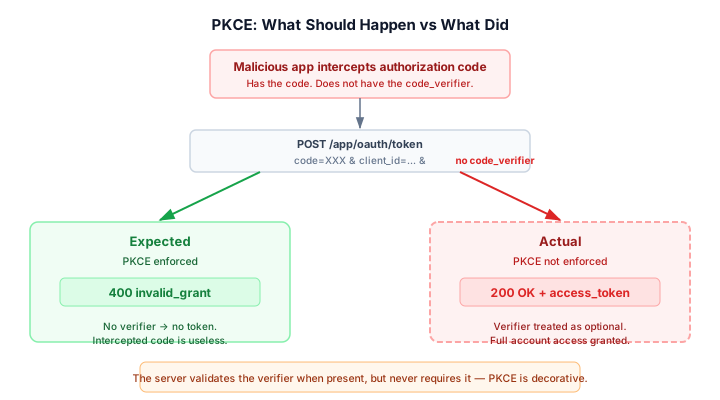
At this point the malicious app has the victim’s authorization code. But this is exactly the attack PKCE was designed to prevent.
When the legitimate app starts an OAuth flow, it generates a random secret called a code_verifier, hashes it into a code_challenge (SHA-256), and sends the challenge with the authorize request. Later, when exchanging the code for a token, the app proves it started the flow by including the original verifier. The server hashes it, compares it to the stored challenge, and only issues a token if they match. An app that intercepted the code never had the verifier — the exchange should fail.
The real app does send a PKCE challenge:
GET /app/oauth/authorize?... &code_challenge=<S256 hash> &code_challenge_method=S256So the defense is there, on paper. I exchanged the intercepted code without a code_verifier:
POST /app/oauth/tokengrant_type=authorization_code&code=<intercepted code>&redirect_uri=redacted://redirect/android&client_id=<redacted>200 OK. Valid token. Full account access.
I tested the three cases to confirm:
code_verifier | Response |
|---|---|
| Omitted entirely | 200 — token issued |
| Correct value | 200 — token issued |
| Wrong value | 400 invalid_grant |
The server validates the verifier when you send one but doesn’t require it. PKCE is requested but not enforced — the one defense built for this exact scenario is a no-op.
Persistent access
The token exchange returned more than an access_token — it also included a refresh_token.
Access tokens expire in an hour, but the refresh token lets the malicious app silently request new ones without any further user interaction. As long as the refresh token is valid, the attacker maintains access to the victim’s account.
No device binding
I verified that the token works off-device by issuing it on a phone and using it from a Linux host with curl. The server does not check whether the token is being used from the same device that requested it. There is no device fingerprint, no IP binding, no DPoP proof. This means the malicious app can exfiltrate both tokens to an attacker-controlled server, and the attacker can operate the victim’s account remotely, from anywhere, for as long as the refresh token lives.
The PoC
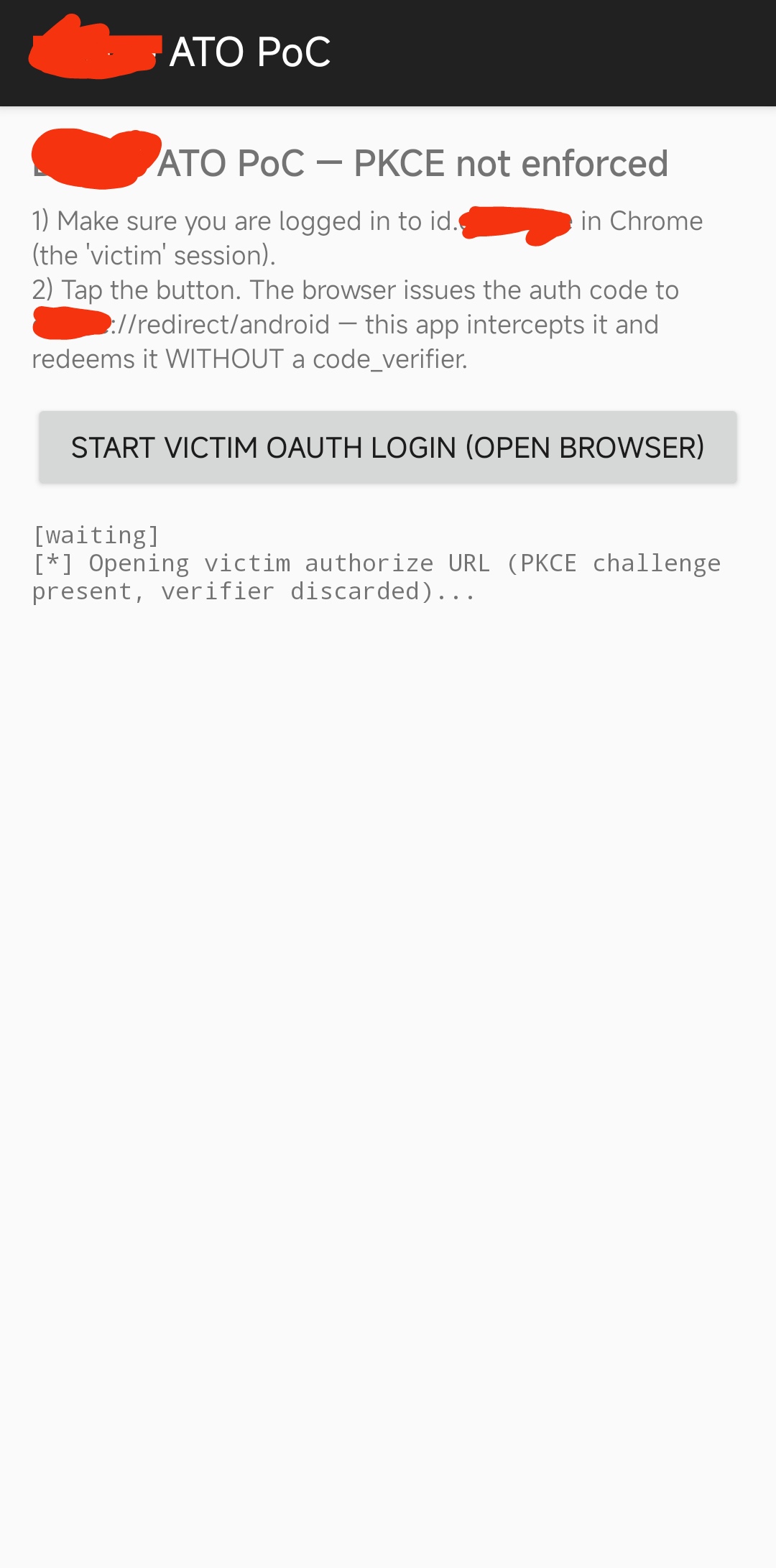
I built a minimal app that registers redacted://redirect/android, intercepts the code, exchanges it, calls api/mobile/user/profile with the stolen token, and prints the victim’s data.
Final words
This was a unique bug class for me, since I work mainly on web applications, its a refreshing new domain for me. There were many other things involved in the exploitation process, in debugging process that deserve its own blog for anyone trying to get into android testing. See you in the next writeup. Adios
Thanks for reading, hope you enjoyed.
← Back to writeups