

Breaking SameSite=Strict in chrome
Breaking SameSite=Strict in Chrome.
Hello Hackers, here’s how we, me and my friend bug_blitzer bypassed SameSite=Strict, the pillar of protection against XS-Leaks and CSRF.
She was testing an endpoint with no CSRF protection. The cookies defaulted to SameSite=Lax since the application hadn’t explicitly set the SameSite attribute, which is standard browser behavior. To understand what that means: SameSite=Lax allows cookies on top-level navigations (like clicking a link) but blocks them on cross-site subresource requests. SameSite=Strict is stricter, it blocks cookies on all cross-site requests, including top-level navigations, unless the request originates from the same site. She built a POST-based CSRF PoC, tested it, and as expected, the request was blocked. SameSite doing its job.
Reluctantly, opening the Caido proxy history to confirm the standard “request blocked” (403) behavior. Then we opened DevTools. And lo and behold a new request appeared in the history. With both Strict and Lax cookies attached. Our CSRF payload had executed.
Wait, what?
We tried it again. Same result. Every time DevTools opened, a request fired carrying full auth cookies.
This wasn’t normal. Sure, there are methods that can detect DevTools opening, but why would that trigger an authenticated CSRF request that bypassed SameSite protections?
The Hunt for Root Cause
I started combing through the JavaScript files one by one. Hours passed.
A few things immediately complicated the investigation:
Analytics overload: The application was heavily instrumented, even switching between tabs triggered HTTP requests. Likely using blur or focus events to track user engagement, which created massive noise in the request logs.
Webpack hell: The codebase was bundled into dozens of minified JavaScript files. No matter what I tried, disabling scripts, overwriting functions, I couldn’t locate the request initiator.
Here’s the problem: normally you’d reload the page with DevTools open and watch the initiator stack. But since opening DevTools was the trigger, that approach was impossible. Any reload would restart the conditions and the initiator(its a tab in devtools, that shows request origin.) would just point back to DevTools itself.
A quick Google search led me to chrome://net-export for network logging. Figured I could capture everything and search through it. No luck. Turns out service workers intercept and replay traffic above the network stack layer, so the requests never showed up in the logs. chrome://net-export only captures what reaches Chrome’s network stack, and service worker-intercepted requests are resolved before they ever get there.
Binary search time: Started systematically disabling components. Eventually noticed a service worker running. Had a hunch it was cache related. Unregistered the service worker, request stopped firing.
There it was. Two days of brute forcing to find one service worker.
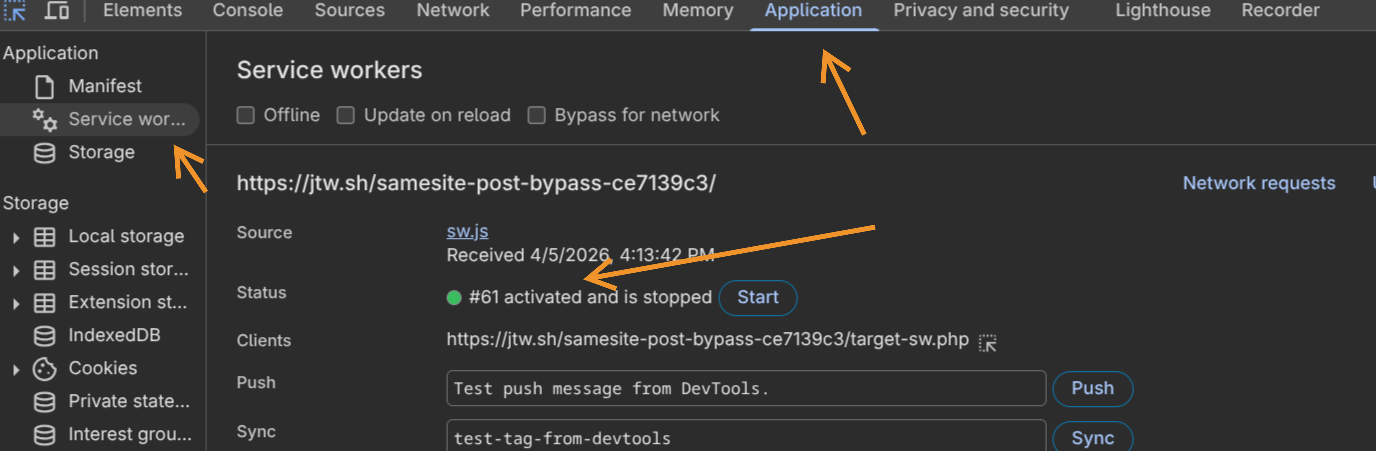
Okay. So it’s the service worker. But why would a service worker cause SameSite cookies to attach on what was clearly a cross-site request? To answer that, we need to understand what makes service workers fundamentally different from everything else running in the browser.
Understanding Service Workers
Service workers are network proxies that run at the origin level, completely separate from any page context. They can intercept fetch requests, serve cached responses, and persist even when all tabs are closed, which is what makes them useful for offline-capable apps and PWAs. Crucially, they are trusted by the browser as same-origin code, so requests they handle are treated as originating from the target origin, not from whoever triggered the navigation.
The important thing here isn’t what the service worker does but just that it exists on the target origin. That alone is the precondition.
The Actual Mechanism
After analyzing this behavior, here’s what was actually happening:
When the attacker’s page submits a cross-site POST to the target, the browser navigates there. The initial request carries no SameSite=Strict cookies, expected behavior. The browser lands on the target page. But then DevTools opens.
Chrome’s Sources panel tries to display the source of the page. The response from that POST was never cached. So Chrome re-fetches it. Here’s the problem: that re-fetch is initiated from the current page’s context, which is now the target origin. Chrome treats it as a same-site request. The original POST body gets replayed, SameSite=Strict cookies attach, and the CSRF payload executes.
As the Chromium report put it: “This new request is initiated from the current site, which is a contradiction if the original navigation came from cross-site.”
The service worker’s role here is more of an unlock condition. Without one registered on the target, Chrome just shows “Content unavailable. Resource was not cached” and stops. The service worker being present is what causes Chrome to attempt the re-fetch instead of giving up.
Why the Security Boundary Broke
SameSite was actually working correctly the whole time. The bug is in Chrome’s DevTools Sources panel:
- Wrong context for re-fetches: DevTools assigns same-site context based on the current page, not the original navigation. A cross-site POST that lands on the target origin should not spawn same-site re-fetches.
- POST body replay: The re-fetch replays the original POST body, meaning the attacker’s payload travels with it. This isn’t just a cookie leak, it’s a full request replay with the attacker-controlled body.
- Service worker as gatekeeper: Without a registered service worker, Chrome doesn’t attempt the re-fetch at all. The SW is what flips that behavior, because it intercepts the cache-miss and forces a real network fetch.
The attacker never crossed the SameSite boundary directly. Chrome did it for them.
The Attack Vector Explained
Here’s the full chain:
Step 1: Precondition, Service Worker on Target
The target application needs a service worker registered. It doesn’t have to do anything special, just exist. Most modern web apps have one for caching or push notifications.
Step 2: Victim Visits Attacker’s Page
The attacker’s page fires a cross-site POST to the target. No SameSite=Strict cookies attach, expected. The browser navigates to the target page.
Step 3: Victim Opens DevTools
F12, Ctrl+Shift+I, right-click then Inspect. The Sources panel tries to load the page source. The POST response wasn’t cached, so Chrome re-fetches it.
Step 4: The Bypass
That re-fetch is same-site. Chrome replays the POST body. SameSite=Strict cookies attach. Request goes through with full authentication, silently, in the background.
Going Public
At this point, I pinged Jorian for a second opinion. He created the PoC and submitted a report to the Chromium team. Wouldn’t have been possible without him since I was having issues with my own PoC. Thanks Jorian for the help.
After a few days of triage, they assigned it severity S3 priority P2 due to the unlikely user interaction requirement. Opening DevTools isn’t something that happens automatically in typical browsing scenarios, requiring multiple deliberate clicks or Ctrl+Shift+I or F12 to trigger. That interaction barrier is what kept it from a higher severity.
Jorian was also able to trigger the request by opening page source. Ctrl+U would trigger the same cache issue, and refreshing the page and confirming the resubmission prompt would replay the request again. That alternate trigger was submitted separately as Issue-470629629.
The Fix
The Chrome team patched this in inspector_resource_content_loader.cc. This file is responsible for loading resource content when DevTools’ Sources panel requests it, which is exactly where the broken re-fetch was being initiated. The fix was two lines:
resource_request.SetMode(network::mojom::RequestMode::kSameOrigin);// kOnlyIfCached requires kSameOrigin mode.Quick refresher on what that actually means. Every fetch has two relevant properties: a request mode that controls where the request can go, and a cache mode that controls whether the cache or network gets touched. They get checked at different stages of the pipeline.
The three modes that matter here, defined in fetch_api.mojom:
kNoCors: the default for embedded resources like<img>and<script>. Lets the request go anywhere, but the response comes back opaque, meaning the JS caller cannot read its contents. Critically, it does not restrict where the request goes or prevent cookies from attaching.kSameOrigin: if the target is cross-origin, Chrome kills the fetch immediately. Nothing reaches the network or a service worker.kOnlyIfCached: grab whatever is in the HTTP cache, return a network error if nothing is there. Never hit the network.
Here’s the catch. The Fetch spec is explicit about kOnlyIfCached: “(Can only be used when request’s mode is same-origin.)” DevTools wasn’t doing that. It set kOnlyIfCached but left the mode as the default kNoCors.
The fetch pipeline order matters here. Requests flow through: service worker then HTTP cache then network. kOnlyIfCached is supposed to stop the request at the HTTP cache layer if there’s a miss, never going further. But service workers sit above the HTTP cache in that pipeline. When a service worker intercepts a kNoCors + kOnlyIfCached request, the cache-only constraint doesn’t propagate through the SW code path. The service worker receives the intercepted request and, finding no cached response, lets it fall through to the network. At that point Chrome makes a real network fetch from the target origin’s context: same-site, Strict cookies attach, POST body replays, CSRF fires.
Without a service worker, the request goes straight from the fetch pipeline to the HTTP cache. The POST response isn’t there, kOnlyIfCached returns a miss, and DevTools shows “Content unavailable”. Clean stop.
The fix just tells Chrome what the spec already said. Setting kSameOrigin explicitly means that if the resource was loaded via a cross-site navigation, the re-fetch Chrome attempts from the target origin’s context will be killed immediately if the origins don’t match, with or without a service worker in the way.
One wrong default request mode. That’s the whole bug.
Questions? Found something similar? Feel free to reach out, always interested in discussing weird browser behavior and security boundaries.
← Back to blog